
Install takes longer on slow connections and is normal to appear stalled at 98%
iPhone
Android
PC
Mac
Minimum supported iPhone 12/13 Pro (6gb RAM, iOS 16.4) or iPhone 14+.
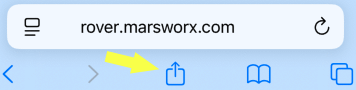
Open the 'Share' menu and select 'Add to Home Screen' (enables offline use).
Open Rover from the home screen icon and then press the 'Install Rover' button below.
Install screen must remain open for the install to continue.
Press the 'Install Rover' button below.
Install screen must remain open for the install to continue.
When the install finishes select 'Add to Home Screen' from the menu in Chrome then 'Install' to enable offline use.
Press the 'Install Rover' button below.
When the install finishes Rover can optionally be installed as a standalone application by pressing 'Install App' from the right side of the Chrome/Edge URL bar.
Press the 'Install Rover' button below.
When the install finishes Rover can optionally be installed as a standalone application by selecting 'Add to Dock' from the Safari 'Share' menu.
Loading marsworx rover:
On initial installs or updates this may take several minutes...